
Linux MP3 music player with a retro vibe
If you grew up with MP3 players like Winamp or Sonique, you know the feeling: a simple window, your local offline library, hit play.
Desktop MP3 brings an even more minimalist, no-bells-and-whistles, retro-styled MP3 player experience to today's desktop.
Download Desktop MP3
Desktop MP3
Play your local offline collection of MP3s
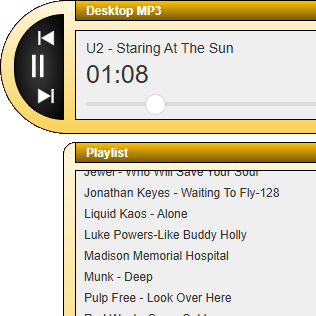
Use the Discover New Music2 button to explore new music for your library.
Play your offline music. Your way
Offline & Private
Play your local MP3s offline on your Linux desktop. No streaming necessary. No account setup needed. No personal info required.
Desktop App
Features you expect from a minimalist, retro-styled desktop music player such as repeat, playlist, and integration with the Linux control center.
Keeping It Simple
Intuitive playback controls with an easy-to-use and uncluttered playlist. No bells-and-whistles to get in the way. Collapse the playlist for an even more compact experience.
Simple. Local. Your Music.
If you grew up with MP3 music players like Winamp or Sonique, you know the feeling: a simple window, your library, hit play. Desktop MP3 brings a minimalist retro-styled MP3 player experience to today's desktop.
Install Desktop MP3 on your Linux machine, point it at your MP3 folder, and you're done. No subscriptions, no algorithms, just offline playback and a UI that puts your music first. No account setup, no cloud streaming. Just your music on your machine.
Step 1
Download
Install Desktop MP3 on your Linux machine.
Step 2
Add your music
Point to your MP3 music folder.
Step 3
Hit play, next, previous
Navigate your tracks without the clutter.
No bells-and-whistles
Desktop MP3 features a free-form user interface design, a style which fans of early desktop MP3 music players such as Winamp and Sonique will feel at home with.
In the spirit of minimalism, Desktop MP3 does not have the full feature set of the mainstream players of yesteryear or even modern services. It does not support features such as visualizations, audio effects, equalizer, skins, ID3 tag editing, online radio, cross-fade, balance, multiple file formats, scrobbling, etc. Album art is limited to displaying in the operating system's now-playing center.
Features are limited to the bare minimum in order to keep the app simple and focused on playing your music. Desktop MP3 is not meant to be a full-featured clone of early MP3 players. It is meant to be a minimalist, retro-styled app for audio enthusiasts who want to play their own local offline MP3 library. No streaming, no accounts, no cloud. No frills.
If the minimalist experience of Desktop MP3 is the right fit for you, welcome aboard!
If you are looking for a more feature-rich experience, we are currently working on a new app separate from Desktop MP3 which is still under wraps. Contact us to be added to the waitlist. Until then, many other amazing MP3 players are only a quick Internet search away.
Frequently asked. Worth a listen
How does Desktop MP3 handle privacy?
Does Desktop MP3 play cloud-based music or other audio formats such as OGG?
How much does Desktop MP3 cost?
What is unique about Desktop MP3's user interface?
Are there any more screenshots of Desktop MP3?
What technology stack was used to build Desktop MP3?
Ready to spin Desktop MP3 ?
Get the retro desktop player for Linux today.