
Backstory
Technical Backstory of Desktop MP3
The journey starting with native Cocoa for macOS, exploring many cross-platform desktop GUI frameworks for Windows and Linux, and finally choosing Electron for the cross-platform version.
Starting with Cocoa for macOS
The goal was to build an offline MP3 music player to easily enjoy a local library of MP3 music on macOS without the need for an internet connection and without the complexity of modern music players. The app was designed to have the ease-of-use and retro feel of early music players like Winamp and Sonique. The main priorities were: support for free-form user-interface, low resource usage, and native integration with the operating system's now-playing center.
The first version was built and polished for macOS using Cocoa, Storyboards and Objective-C. This framework easily covered all three top priorities: the binary was less than 1MB, the app was very resource efficient, and the free-form window was a breeze to implement and the now-playing integration was made easy with Cocoa's MediaPlayer framework. (See Figure 1)
Facing uncertainty about whether there would be interest in an offline desktop MP3 music player for macOS, especially so long after the advent of music streaming services, the app was published under the name of Desktop MP3 in the App Store for Mac. As a result, sales started coming in from multiple countries.
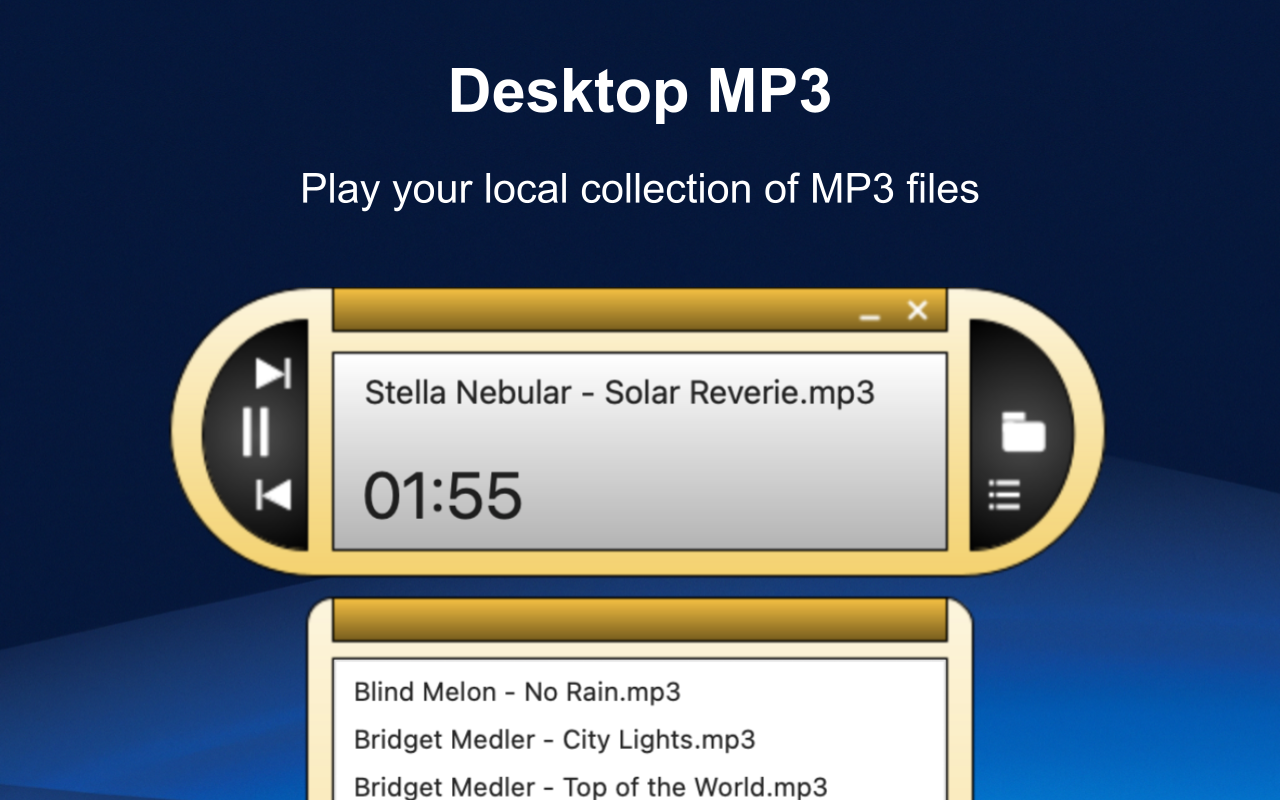
Figure 1: Desktop MP3 for macOS
Exploring Cross-Platform Frameworks for Windows and Linux
With a clear market for Desktop MP3 on macOS, the next step was to bring it to Windows and Linux. Since the macOS version was built with Cocoa, a macOS-only framework, the options for Windows and Linux were to either rebuild it natively for each platform or use a cross-platform framework.
Over 30 frameworks were researched, most of them cross-platform, but some os-specific. Each framework came with its own challenges. Some resulted in a file size larger than hoped, some didn't work as consistently as expected, some didn't directly interface with the operating system's now-playing center, and some lacked free-form transparent window capabilities baked-in, etc.
There was a wide range of file sizes for the cross-platform frameworks. The Electron version ended up being the largest in file size, with C or C++ based frameworks being the smallest. (See Figure 2)
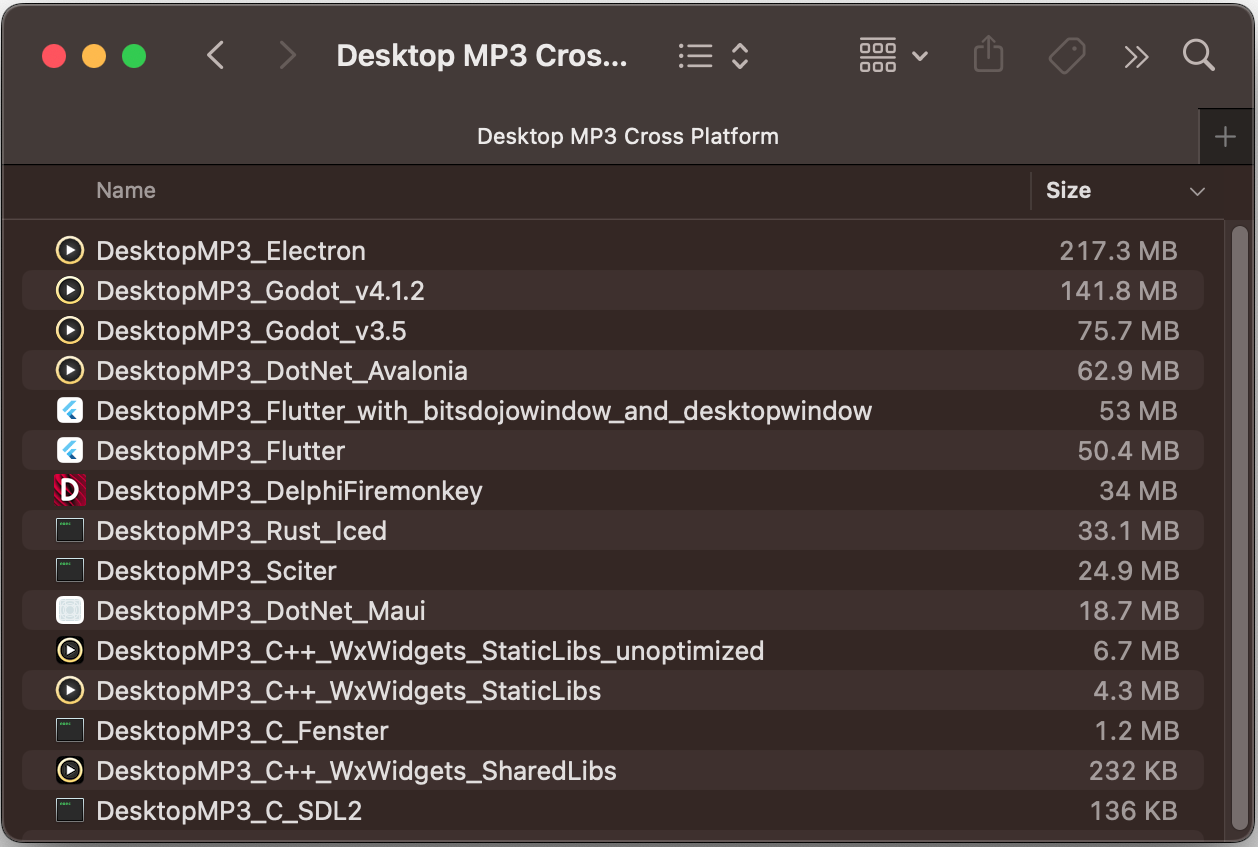
Figure 2: Desktop MP3 file size using different frameworks
Cross-Platform Proof-of-Concepts
Using the macOS version as the standard for features and user-interface, proof-of-concepts were built in many of the GUI frameworks that had been researched.
To ensure no stone was left unturned, Windows-only frameworks like WPF, C++ WinForms, .NET WinForms, and Delphi VCL were explored. These were considered as a last resort in case a cross-platform solution couldn't meet the performance standards, even if it meant maintaining a completely separate codebase.
Some of the cross-platform GUI frameworks tried were Electron, Tauri, QT Widgets, QT QML, WxWidgets, OpenFin, Godot 3, Godot 4, Sciter, Delphi Firemonkey, Lazarus, Flutter, .NET Avalonia, .NET Maui, Fenster, SDL2, Rust (with Iced), Progressive Web App and more. (See Figure 3)
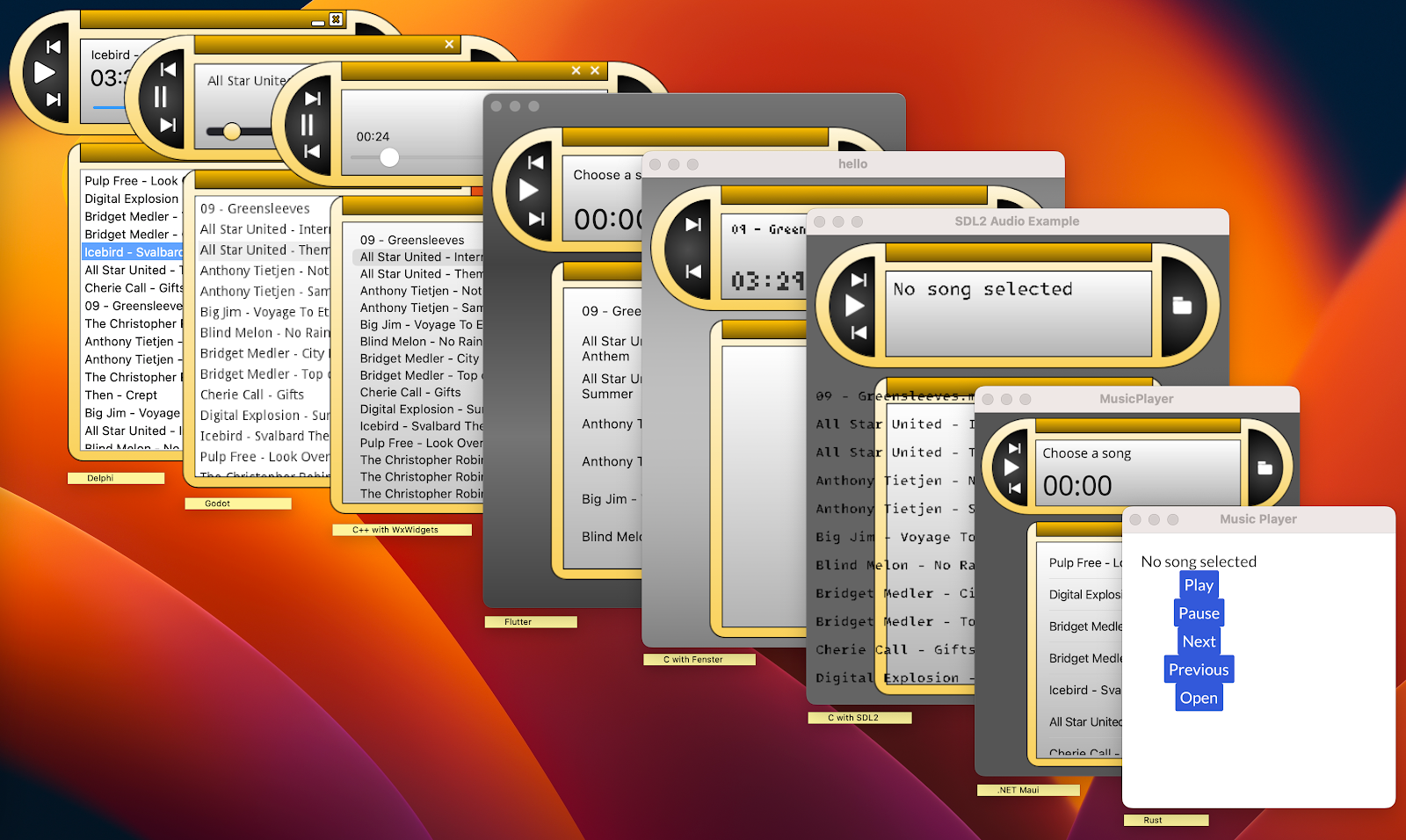
Figure 3: Desktop MP3 proofs-of-concept using different frameworks
Click-Through Transparency: The non-negotiable requirement
One requirement that wasn't going to be compromised was the retro free-form user interface with click-through transparency and anti-alised edges. After trial and error trying to achieve a consistent cross-platform experience matching the specific requirements of the macOS version using different frameworks, it came down to three frameworks that offered the least amount of friction to meet Desktop MP3's specific goals: Avalonia, Tauri and Electron.
Avalonia
Avalonia supports free-form user interface and low resource usage. However, the click-through ability in the transparent area was not consistent across operating systems. More time working on it could likely yield a clever workaround but with Avalonia not being quite as mainstream as Electron or Tauri, it did not make the final cut. Even though it didn't make the final cut for Desktop MP3's unique goals, Avalonia is impressive and well worth considering for anyone looking for a cross-platform desktop GUI framework.
Electron
Electron supports free-form user interface and low CPU usage. The RAM usage and file size were higher than hoped for due to shipping a copy of Chromium and loading it into memory, but that trade-off could be acceptable in exchange for the developer experience and resulting app consistency across operating systems. Click-through on transparent regions was handled by setShape(), which defined the window's interactive region at the OS level.
Tauri
Tauri supports free-form user interface, and small file size. CPU usage was low, but RAM was higher than hoped for due to loading the host-provided browser into memory. That trade-off was acceptable in exchange for the developer experience and small binary size. Click-through on transparent regions was handled by toggling setIgnoreCursorEvents based on cursor hit-testing. Desktop MP3 doesn't use anything too out-of-the ordinary but something to keep an eye out for is that because Tauri is reliant on the host-provided browser, the UI could have slightly different results across operating systems or the host-provided webview could change versions out from under the app at any given time.
Arriving at Electron for Windows and Linux
Electron was chosen for the cross-platform version of Desktop MP3 because it offered the least amount of friction, the most consistency across operating systems, and provided one of the best developer experiences for Desktop MP3's specific use case. Other frameworks that were researched and used for proof-of-concepts are great at what they specialize in, but some of the unique requirements that were important to Desktop MP3 were not supported by those frameworks.
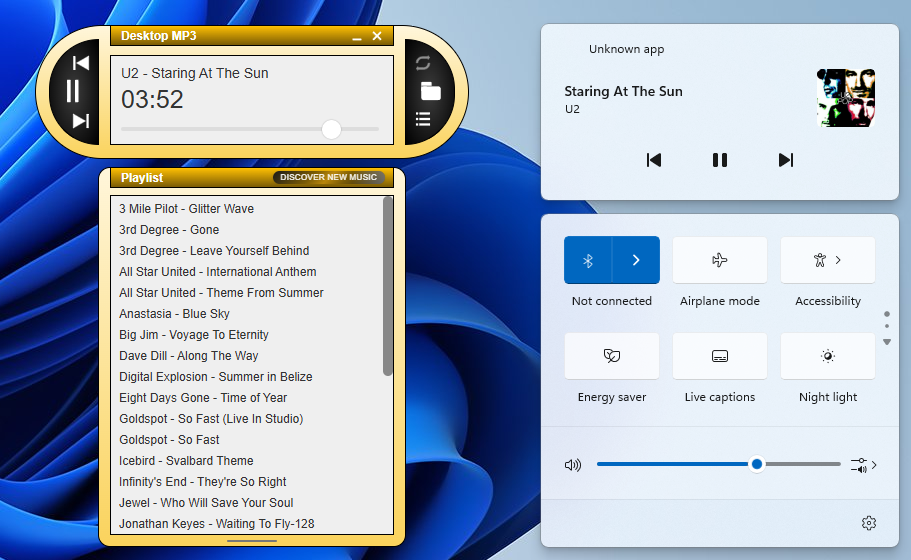
Figure 4: Desktop MP3 using Electron integrated with Windows now-playing center
The Reality of Resource Usage in Electron
Some Electron-based apps have come under a scrutiny for being bloated or resource-intensive, while others have been shown to be very stable and reliable when done right. The sincere hope is that Desktop MP3 will be counted among the good ones.
RAM Usage: Electron ships with a copy of Chromium unlike Tauri which uses the os-provided browser engine into memory. In the case of Desktop MP3 both Electron and Tauri ended up using around the same amount of RAM when including the renderer processes.
File Size: Because Electron ships with a copy of Chromium the download file size is larger than that of a Tauri app, but in exchange the consistency in the renderer across operating systems met Desktop MP3's goals.
Will the Electron Version replace the macOS Native Version?
The Windows and Linux Electron versions of Desktop MP3 recently achieved feature parity with the macOS native version but doesn't yet have the level of user base that the macOS native version has. The decision to replace the macOS native version with the Electron version is not yet made and will depend on several factors.
Try Out Desktop MP3
If you want to try out Desktop MP3, the links are on the download page.
And if you like what you see, please consider leaving a review on the App Store for Mac, the Microsoft Store, or send an email to say hello. Feedback is always appreciated!
Still Here? Cool, Here's Something Extra!
Check out the technology stack page to learn more about the tech behind Desktop MP3.