
Desktop MP3 music player with a retro vibe.
Desktop MP3 — your tunes, your way.
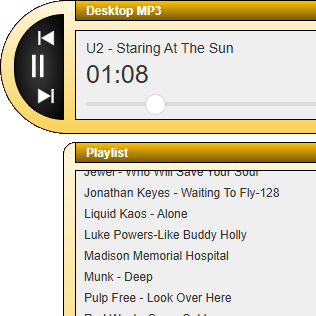
Play your music offline. Private by design.
Offline & Private
Play your local MP3s offline. No streaming necessary. No account setup needed. No personal info required.
Desktop app
Built for the desktop. Features you expect from a retro player such as repeat, playlist, and ID3 tag editing.
Compact Playlist
Select a folder with the option to include recursive subfolders. See your songs in a compact, un-cluttered list.
Simple. Local. Your Music.
Install the app, select your MP3 folder, hit play. No account setup, no cloud streaming. Just your music on your machine.
Step 1
Download
Install Desktop MP3 on your desktop.
Step 2
Add your music
Point to your MP3 music folder.
Step 3
Hit play, next, previous
Navigate your tracks without the clutter.
Priced right. On key
macOS Native Version
Apple Silicon & Intel. Built to run natively on macOS.
- Native using Cocoa/AppKit
- Intuitive playback controls
- Easy-to-use playlist
- Now Playing integration
- Automatic updates
- Battle-tested and stable
- System media keys
- Resizeable playlist window
- File Info (ID3 Tag Editor)
- Equalizer
- Visualization effects
Mac App Store
Cross-Platform Version
Electron App. Windows & Linux available. macOS coming soon.
- Electron-based cross-platform
- Same basic features as macOS
- File info window
- Resizeable playlist window
- System media keys
- File Info (ID3 Tag Editor)
- Equalizer
- Visualization effects
- Automatic updates (Windows)
- Automatic updates (Linux)
- Automatic updates (macOS)
- Not battle-tested, not stable
iPhone & Android
Desktop MP3 is, well, for desktops.
Want to play MP3s on your phone or tablet? Check out Breeze Amp, our mobile offline music player for iOS and Android.
Frequently asked. Worth a listen
What about privacy?
Desktop MP3 is designed to be a privacy-first music player. It collects basic analytics usage data such as features used, launch times, playlist length, and other basic metrics such as operating system and version to help us improve the app and understand how it is being used. It does not track your location. It does not collect your IP address. It does not collect your song titles or artist names.
Does Desktop MP3 play cloud-based music or other audio formats such as OGG?
Desktop MP3 does not play online or cloud-based music. It plays offline MP3 files that are saved to your desktop. Support for other audio file formats is yet to be determined.
How much does Desktop MP3 cost?
The macOS version is battle-tested and is available for a modest price through the macOS app store. The cross-platform Electron version has more features, but is still in early access and is currently available for free.
What is unique about Desktop MP3's user interface?
The app is based on a free-form user interface design. Fans of early desktop MP3 music players such as Winamp and Sonique will feel at home with Desktop MP3's user interface.
Are there any more screenshots of Desktop MP3?
We're glad you asked! Screenshots of the cross-platform version can be found on the Cross-Platform Screenshots page, and screenshots of the macOS native version can be found at the Mac App Store.
Why did you choose native for macOS and Electron for the cross-platform version?
Happy to explain! But it's a long story, so head over to the Technical Backstory page to learn more.